ASUS ROG Courser gaming chair: RGB lights, genuine back support, pricey but solid
The ASUS ROG Courser is a gaming chair featuring six RGB lighting zones, four light strips running down the backrest, and an all-black EPU leatherette finish. The reviewer admits RGB adds nothing to gameplay but credits the chair with curing his back pain during long World of Warcraft sessions. It is aimed at gamers who want striking aesthetics alongside ergonomic support.
Full text
RGB is not integral to any gaming setup. Ever. Colourful disco lights won’t make you play better or be more comfortable while you (by you, I mean me) lock in for a long session of WoW.
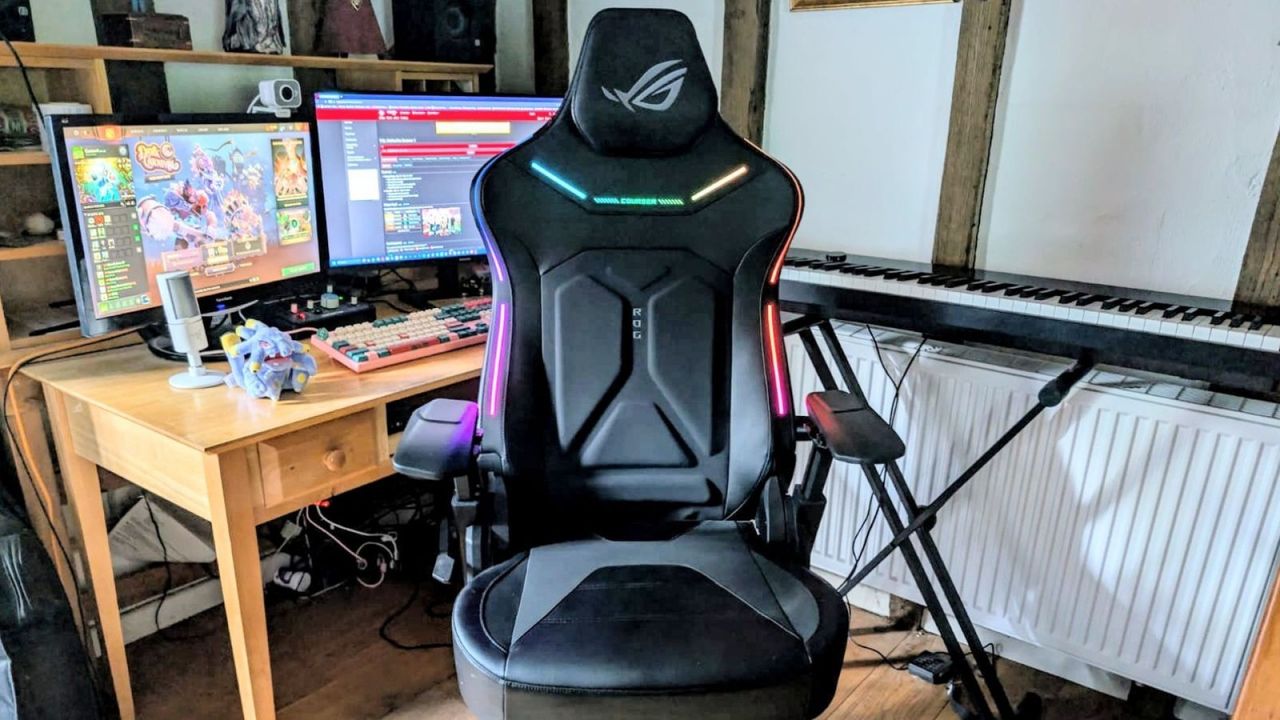
So why exactly does the new ASUS ROG Courser gaming chair boast six areas of RGB lighting? Is it necessary? Absolutely not. But if we reduced every gaming chair down to the barest of essentials, we’d probably all be sitting in stark grey office chairs. The Courser is a gaming chair with unabashed flair. Sporting four lighting strips that extend down the sides of its backrest, with six colour modes glowing next to its all-black EPU leatherette finish.
The cutout area and rear-side ROG logo also light up, and at this point, you might be asking: if the lights aren't visible when you're using the chair, what's the benefit of having them? For those flashy design flourishes and a pretty reasonable set of conventional chair features, the ROG Courser will set you back $750 / £699. That’s definitely on the more premium end of the gaming chair pricing scale, so is the extra lighting really going to be worth it in a stacked market?
Design & Features
Well, for starters, the in-chair lights create an eye-catching look that’s ideal for streamers and content creators. The RGB looks super sleek contrasted against the dark chair. But for those who prefer to game in private, the Rainbow colour mode on the top level of brightness will add a gorgeous, subtle multicolour hue to your gaming room. This is a chair that will add heaps of atmosphere to your setup.
It includes eight different colour settings, five levels of brightness, and several lighting modes, including wave, static, breathing, and colour cycle. But alas, this isn’t Soft-Furnishings-Radar, and we are not just reviewing an ambient light fixture here.
So while the selling point of the ASUS ROG Courser is how it looks, its strongest quality is actually how it feels.
(Image credit: Future) While the Courser shares much of its overall shape with the brand’s Chariot models, its broader frame makes it noticeably wider. It has a roomy seat base of 55cm, offering plenty of space for a broad range of body types.
The EPU leatherette material is smooth and breathable, perfect for keeping cool during gaming sessions on hot, sticky summer nights. It’s also notable that you get 4D armrests on the ROG Courser, which is standard for a gaming chair of this price. There are separate buttons for elevation and the twist functions, then a pull clicker for distance out from the chair.
(Image credit: Future) These 4D armrests can now swivel the entire 360 degrees, too. All these comfort factors combine to form a chair so accommodating you’ll genuinely forget you’re sitting in it until it’s time to chill and kick back. This is when you will become highly aware that you are sitting in something pretty luxurious.
Assembly
Admittedly, I felt a mild wave of panic when the ASUS ROG Courser arrived on my doorstep. My previous gaming chair was constructed for me by an ex-boyfriend, and the thought of piecing together something so complex alone was daunting. I have lost patience and bawled tears of frustration over many IKEA flat-packed furniture items in the past - was my new gaming chair going to prove similarly difficult to build?
Not at all. The Courser was a breeze to assemble, even for a clumsy person with zero experience at putting a gaming chair together. All the parts slotted neatly into place, making the build experience feel simple and stress-free. It took 30 minutes for me to assemble the chair by myself, following the clear instructions card inside the box
Performance
I thought lower back ache was normal, all part of the fun of hunching in a shrimp shape over my PC while I devote another evening to Azeroth. Turns out: it’s not. I’ve been sitting in the ASUS ROG Courser for 4 weeks now, and my spine feels noticeably more limber.
The in-built lumbar support backrest appears to be the key factor here, with its fully adjustable system that can be tweaked according to depth and height - ensuring my posture stays good while I game. The Courser doesn’t have a lumbar pillow, but it doesn’t need one thanks to its dynamic lumbar support system that works very similarly to the Corsair TC500 Luxe and the Secretlab Titan Evo NanoGen .
(Image credit: Future) Unlike most gaming chairs, which shift your body slightly forward or slide you down the backrest when reclined, the Courser has a Dynamic Synchronised Recline System that keeps your posture more consistent with the backrest while reclining up to 155 degrees. This is something we’re seeing more often in the gaming chair market, especially with the LiberNovo Omni , but more recently with the Secretlab Atlas .
It’s a unique, thoughtful detail that makes finding a comfortable position as you lean back much easier, as you won’t need to make adjustments every time you recline. For PC gamers especially, this is a feature to look out for because when you’ve spent ages finding the exact right height and angle of your armrests to match up with the level of your desk so you can aim precisely with a mouse, the last thing you want to do is mess that up by reclining them out of position.
Should you buy the Asus ROG Courser?
(Image credit: Future) The RGB of the ROG Courser might be alluring to a lot of gamers looking for those perfect unicorn vomit vibes in their chill-out spaces, but the price tag of $750 / £699 could be equally off-putting. For context, Asus has charged similar amounts for its ROG Destrier Ergo chair line, so it’s no stranger to outlandish designs and high price tags. But for the same money, or less, you could get yourself a Secretlab Titan Evo (without RGB lighting) and a colorway that represents your favorite gaming franchise. For less money, you could get the still-expensive Razer Iskur V2 NewGen, which gets you a floating backrest, or you could get an AutoFull G7 with seemingly endless adjustable parts.
Compared to those options, Asus obviously offers RGB lighting which we don’t see elsewhere, but having sat in it for around a month, I think the lights are actually the least valuable thing here. The adjustable lumbar support, spacious seat and dynamic recline system make this chair a pleasure to sit in for hours.
If you’re looking for the best value gaming chair, there are great alternatives from Secretlab and Razer, but if you’re after a premium chair that doesn’t look like anything else on the market and backs up its flashy design with comfort, then the ASUS ROG Courser earns its place.
How I tested the Asus ROG Courser
I tested the ASUS ROG Courser for a month before this review was written. I assembled it myself in 40 minutes using the instructions card that came with the chair. It was very easy to build and to lift by myself. I sat in the chair for around 9 hours per day, either working from home or gaming.
For more on how we test gaming chairs , dive deeper into the GamesRadar+ hardware policy .
Looking for more gaming furniture? Check out the best console gaming chairs , the best gaming desks , and the best standing desk .
Comments
No comments yet
















Comments
No comments yet — be the first to weigh in 👇
No comments yet. Be the first!