Full text
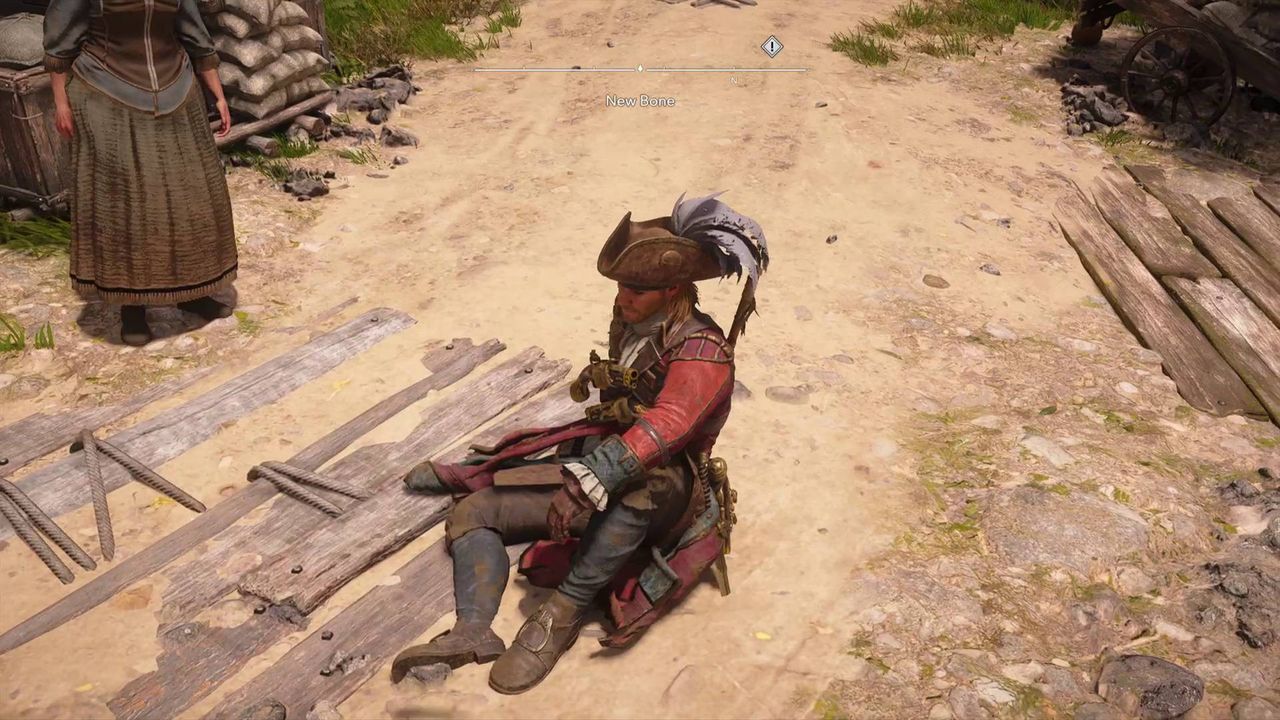
To skip time in Black Flag Resynced – a new feature that wasn't in the original game – you just need to find a good, clear spot for Edward to sit down in, then you use the D-Pad to start passing the hours and change time from day to night. But there are a quite a few limitations to this system that Black Flag Resynced doesn't explicitly lay out, so I've explained everything I know about how to skip time in the game below.
How to pass time in Black Flag Resynced
(Image credit: Ubisoft) To skip time in Black Flag, you must briefly hold down D-Pad Right , which will cause Edward to sit down on the spot and time to speed up. Note that skipping time always takes you to the morning or evening – whichever is next – and you have no control over what time Edward gets up from his hours-long contemplative sit-down.
Importantly, you can't initiate a time skip in Black Flag resynced while in combat or during quests . From experience, you also can't skip time while you're on anything other than solid ground, so no time-skipping while aboard the Jackdaw or in or near the sea. You also can't seem to skip time when any sort of potential threat is nearby, such as wildlife, or if you're near vendors and other NPCs that aren't just the standard population. Essentially, you need to find a relatively quiet spot for Edward to sit down and pass the time.
While I've done a bit of time-skipping as I've played Black Flag Resynced, I've not really found a particularly notable use for it other than if you simply don't want it to be day or night. If a quest requires a specific time of day, it'll skip time for you. Really the only reason that you may want to use this system is if you either find night time too dark and want to skip to daytime so that you can see, or you want to skip to night to make stealth marginally easier, as Edward is a little harder to spot in the dark.
© GamesRadar+. Not to be reproduced without permission.















Comments
No comments yet — be the first to weigh in 👇
No comments yet. Be the first!