iPhone alarms fire silently without sound – iOS 27 beta contains a fix
Numerous iPhone users report that their alarms go off silently, failing to wake them up. Reddit user Jeremy_keister said the issue "practically lost me a job." A fix has been identified in the iOS 27 beta, meaning a solution should arrive with the full release.
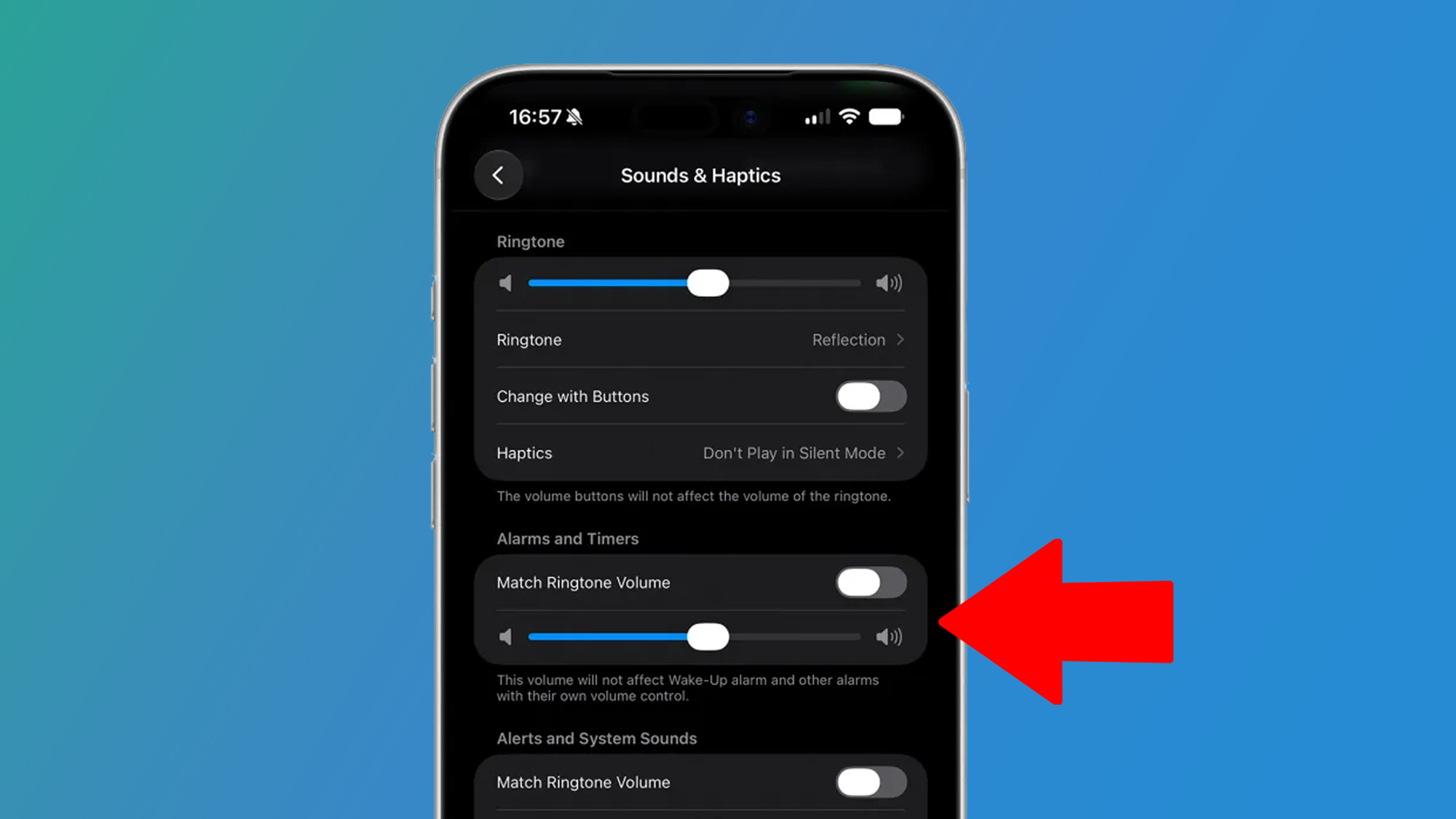
iPhone users say their iOS alarms are going off silentlyThis has reportedly affected the work life of someA fix has been discovered in the iOS 27 betaHow many times have you slept through your phone alarm in the morning? Most of us have experienced it at one time or another — but what if the problem wasn’t so much your heavy sleeping, but more the fact that your iPhone alarm was going off completely silently, meaning it never had a chance of waking you up in the first place? That seems to be what’s happening to a number of iOS users, with several of them complaining that silent iOS alarms have risked or even cost them their jobs. In a since-deleted post on Reddit, user Jeremy_keister said that although their iOS alarm had been set and went off in the morning, it did so silently, making it next to useless. The situation, they said, “has practically lost me a job.” Similarly, user okeanouszeke said the same issue had actually “cost me a job.” Clearly, there’s something going on here, and a little investigation suggests that it might be to do with the volume settings in iOS. Fortunately, it looks like there’s a fix on the way in iOS 27.Silent alarm activated(Image credit: 9to5Mac / Future)If your alarm is ringing silently rather than out loud, it could be due to a certain setting in iOS 26 and earlier. In those versions of Apple’s operating system, there was only one volume control, and this setting would affect alarms, ringtones, system notifications and more all at once. That means that if you’d turned the ringtone volume all the way down to zero, your alarms might also be affected. If you happened to look at your iPhone display while the alarm was going off, you’d see it trying to alert you — but with no volume, you wouldn’t hear a thing. And since Apple didn’t build any kind of warning into iOS, you might not even realize that minimizing the system volume would render your alarms useless. In iOS 27, though, that’s all set to change. Users of the iOS 27 beta have noticed that there’s a new section under Sound & Haptics in the Settings app. There, you’ll find a volume slider for ringtones, one for alarms and timers, and another for alerts and system sounds. In iOS 26 and earlier, you just got one slider that controlled everything. In iOS 27, then, you can set ringtone volume to zero but push alarm volume to full, ensuring your alarms will still wake you up, even if everything else is silent. That should give you the peace of mind to know that you shouldn’t oversleep, whatever your taste for ringtone volume.Another alarming issueThere’s one more issue to be aware of. Some users have reported alarms starting off loud, then suddenly dropping in volume. One potential solution could be to disable Face ID’s attention features in Settings > Face ID & Passcode > Require Attention for Face ID. Supposedly, Apple’s facial recognition tech notices you looking at your iPhone and assumes that you’re fully awake, disabling your alarm in the process. Turning off this feature should allow the alarm to ring until you manually switch it off. So, if you’ve been struggling to wake up on time in the mornings and think a silent alarm could be the culprit, there are a few potential solutions to try. When iOS 27 launches this fall, this problem might become a thing of the past.

















Comments
No comments yet — be the first to weigh in 👇
No comments yet. Be the first!